
Why I Ignored This AI Bible Study Tool for a Year (And Why That Was a Mistake)
For almost a year, I had access to an AI tool inside Logos Bible Software called Study Assistant — and I never touched it. Not once.
I assumed it worked like every other AI tool out there: you type in a prompt, it goes out to the internet, and it drags back... whatever it happens to find. Given how inconsistent that experience can be with general-purpose AI, I wrote it off before I ever gave it a real shot.
I was wrong. Completely wrong.
Once I understood how Study Assistant actually works, I couldn't believe I'd ignored it for so long. There's one specific feature that sealed the deal for me, and in this post I want to walk through exactly what I misunderstood — and why I now believe Study Assistant may be the best AI tool available for serious, responsible Bible study.
What Is Logos Bible Software?
If you're new to Logos, here's the short version: it's far more than a Bible app. Logos Bible Software is an all-in-one Bible study platform that brings together Bibles, commentaries, theological dictionaries, and a massive library of scholarly resources in one place.
Think of it like Kindle for theology. You build a digital library of books — but instead of novels, you're collecting commentaries, lexicons, systematic theologies, and pastoral resources. And Logos doesn't just let you read those resources; it gives you tools to search across your entire library at once, including original-language tools for studying Hebrew and Greek, even if you've never formally studied either language.
Logos is completely free to download. You create a free account, install it on any device, and your library syncs automatically across your computer, phone, and tablet. The free version comes with a handful of starter resources, but the real power of Logos comes as you add more books to your library — and there are literally thousands of resources available inside what I call the "Logos universe."
My Initial Skepticism About Logos AI
Recently, Logos introduced AI-powered features, and my first reaction was hesitation. I'd had enough frustrating experiences with general AI tools giving inconsistent, occasionally inaccurate answers that I didn't want that anywhere near my sermon prep or Bible study. So when Study Assistant was introduced to me roughly a year ago, my response was basically, "No thanks, I'll keep doing things the way I've always done them."
That assumption cost me a year of missed efficiency. Here's why.
What Is Study Assistant?
Study Assistant is the AI-powered research feature built directly into Logos Bible Software. You type a question in plain English — just like you would with any AI chatbot — and Study Assistant searches for relevant information and returns a synthesized answer.
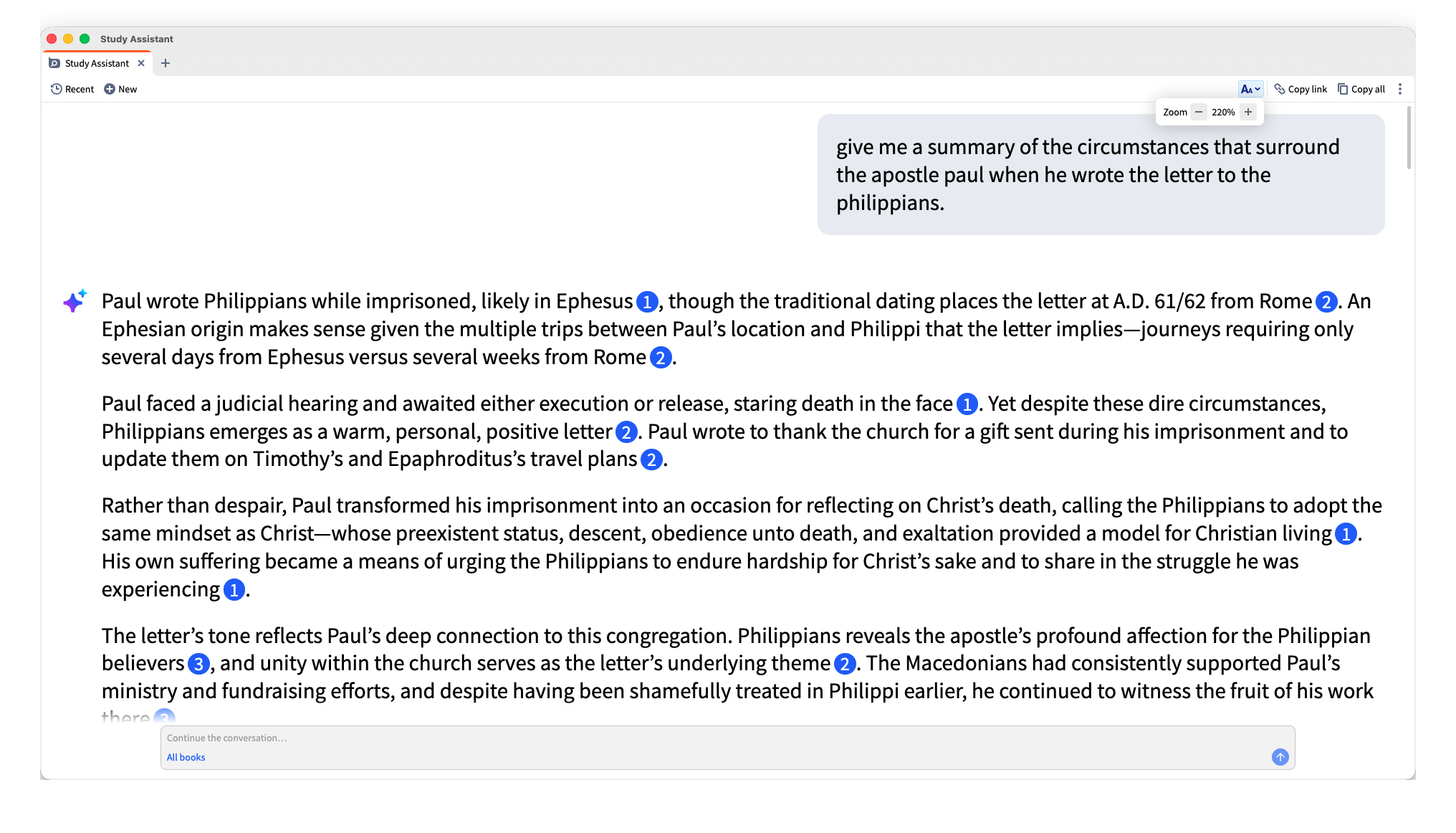
For example, when I was preparing for a funeral I was officiating, I wanted to double-check some background details on Philippians before I used that material in my message (which I later turned into a YouTube video). So I typed this prompt into Study Assistant:
"Give me a summary of the circumstances that surrounded the Apostle Paul when he wrote the letter to the Philippians."
Nothing fancy — just a general, natural-language question. Within about a minute, Study Assistant returned four full paragraphs of information.
The Feature That Changed My Mind
Here's the thing that actually sold me on using AI for Bible study: Study Assistant does not search the open internet.
With most AI tools — ChatGPT, Gemini, Claude, and others — when you enter a prompt, the tool pulls from a vast, largely unverifiable pool of internet content. You have no idea who wrote the source material, how reliable it is, or whether the AI is quietly hallucinating information that sounds convincing but isn't accurate.
Study Assistant works differently. It only searches inside the resources that already exist within the Logos library — the books, commentaries, and academic resources curated and sold through Logos. It never leaves that ecosystem to go find outside content.
That distinction matters enormously for anyone doing serious theological research. I trust the resources inside Logos because they're written by credentialed scholars and reputable publishers. I don't agree with every conclusion in every book in my library — no one agrees with everything they read — but I know the source material has gone through an editorial and academic vetting process. That's a completely different foundation than "whatever showed up in a Google search."
You Can Even Control the Search Scope
Study Assistant also lets you set parameters for how wide or narrow the search should be:
- All Books — searches the entire Logos universe, even resources you don't personally own
- My Library — limits results to books you actually own
- Custom scope — narrow it down to a specific commentary series, a single book, or even one author
I personally default to "All Books" for the widest possible range of scholarly input, and the next feature is exactly why.
Full Source Transparency: The Footnote System
This is the feature that turned me from a skeptic into an advocate.
Every response from Study Assistant includes numbered citations — think of them as footnotes. When you hover over one of those numbers, the tool highlights the exact section of the response that came from that specific source.
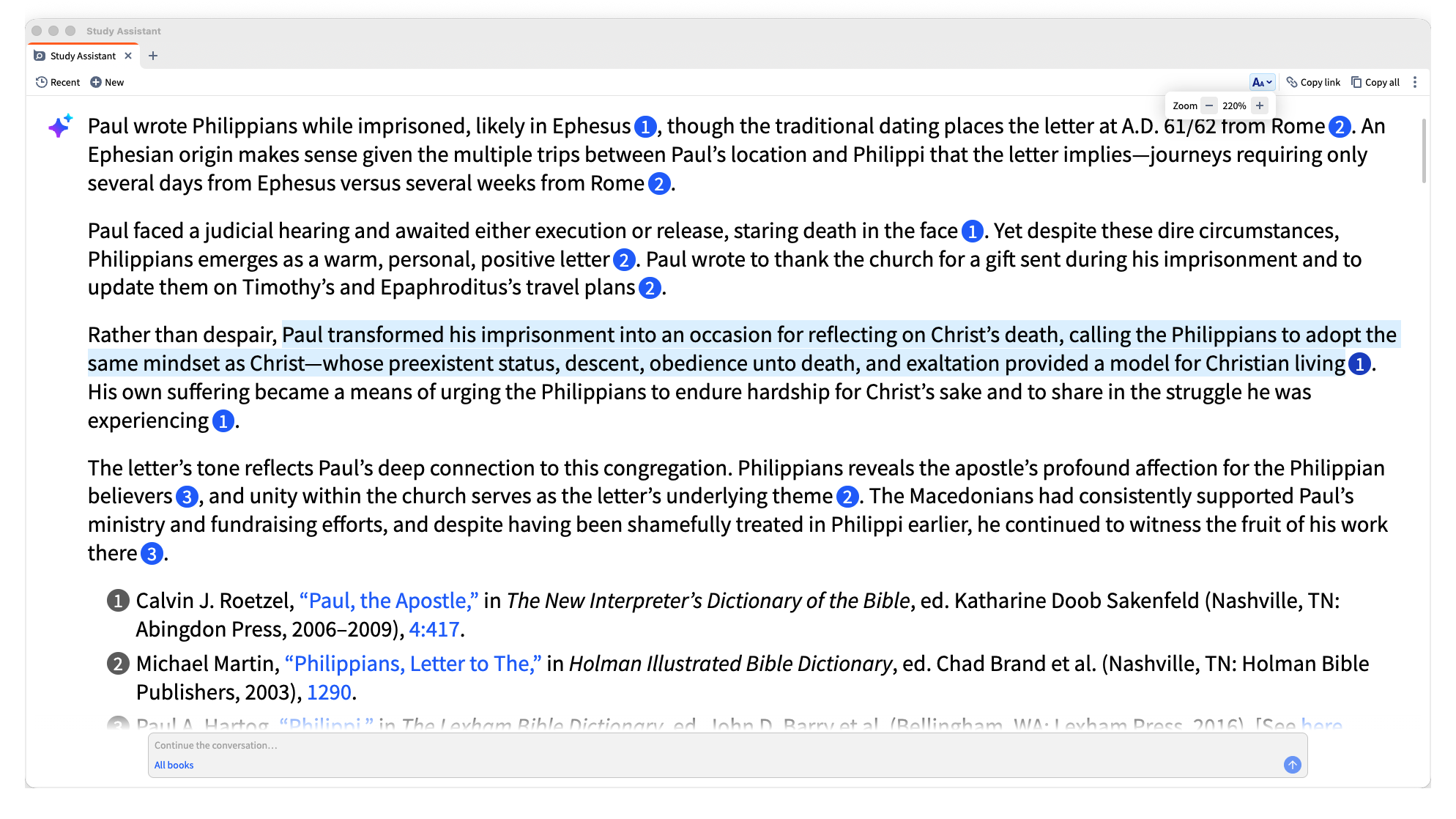
In my Philippians example, the response cited three separate resources. Hovering over each number highlighted exactly which sentences came from which book. If I didn't already own a cited resource, Logos gave me the option to purchase it directly. If I did own it, clicking the citation opened that exact resource to the exact page the information came from.
What struck me most was how little of the response was actually generated by the AI itself. In one case, nearly the entire answer was pulled directly from a cited resource — the only original AI-written phrase was a short transitional sentence connecting the ideas. Everything else was traceable, sourced content from a real scholarly work.
At the end of each response, Study Assistant also generates a bibliography listing every resource used, matched to the citation numbers in the text. You can keep the conversation going too, just like any other AI chat — I followed up by asking about the circumstances the Philippians themselves were facing when they received Paul's letter, and got another sourced, footnoted response in seconds.
Why This Matters for Responsible Bible Study
As Bible teachers, pastors, and serious students of Scripture, we have a responsibility to know where our information comes from. "AI said so" is not a citation. But "this came from a specific, named, scholarly resource that I can open and verify myself" is an entirely different standard of accountability.
That's the gap Study Assistant closes. It gives you AI-level speed and synthesis without sacrificing scholarly traceability. You're not trusting a black box — you're getting a research assistant that shows its work.
Getting Started with Logos and Study Assistant
Logos itself is free to download and use on any device — desktop, laptop, phone, or tablet, all synced together. However, Study Assistant and most of the other AI features require a subscription tier. The good news is that Logos offers a 60-day free trial on subscription tiers, which is more than enough time to put Study Assistant through its paces on your own sermon prep, personal study, or research projects.
If you decide it's not for you, you simply don't continue the subscription — but any books you've purchased remain yours permanently, subscription or not.
Click here to start your free 60-day free trial.
Final Thoughts
I spent nearly a year avoiding a tool that has genuinely changed how efficiently and how responsibly I study Scripture. If you've been hesitant about AI in Bible study for the same reasons I was — worried about unreliable sources, hallucinated information, or answers with no accountability — Study Assistant addresses those concerns directly by staying entirely within a curated library of scholarly resources and showing you exactly where every claim originates.
As of 2026, I believe Study Assistant inside Logos may be the best AI tool available for serious, responsible Bible study.
Try it for yourself. With a 60-day free trial, you have nothing to lose and potentially a whole new level of efficiency to gain in your study of God's Word.
Click here to start your free 60-day free trial.
Dr. Mario Escobedo is a Bible study mentor equipping believers to study Scripture responsibly.
